
Agent Components
Components are the building blocks of every agent workflow. Drag them onto the canvas, connect them in sequence, and configure each one to build your agent’s logic.
The sections below give a brief description of every available component. Click any component name to open its full reference page.
Working with the Canvas
Section titled “Working with the Canvas”Adding Components
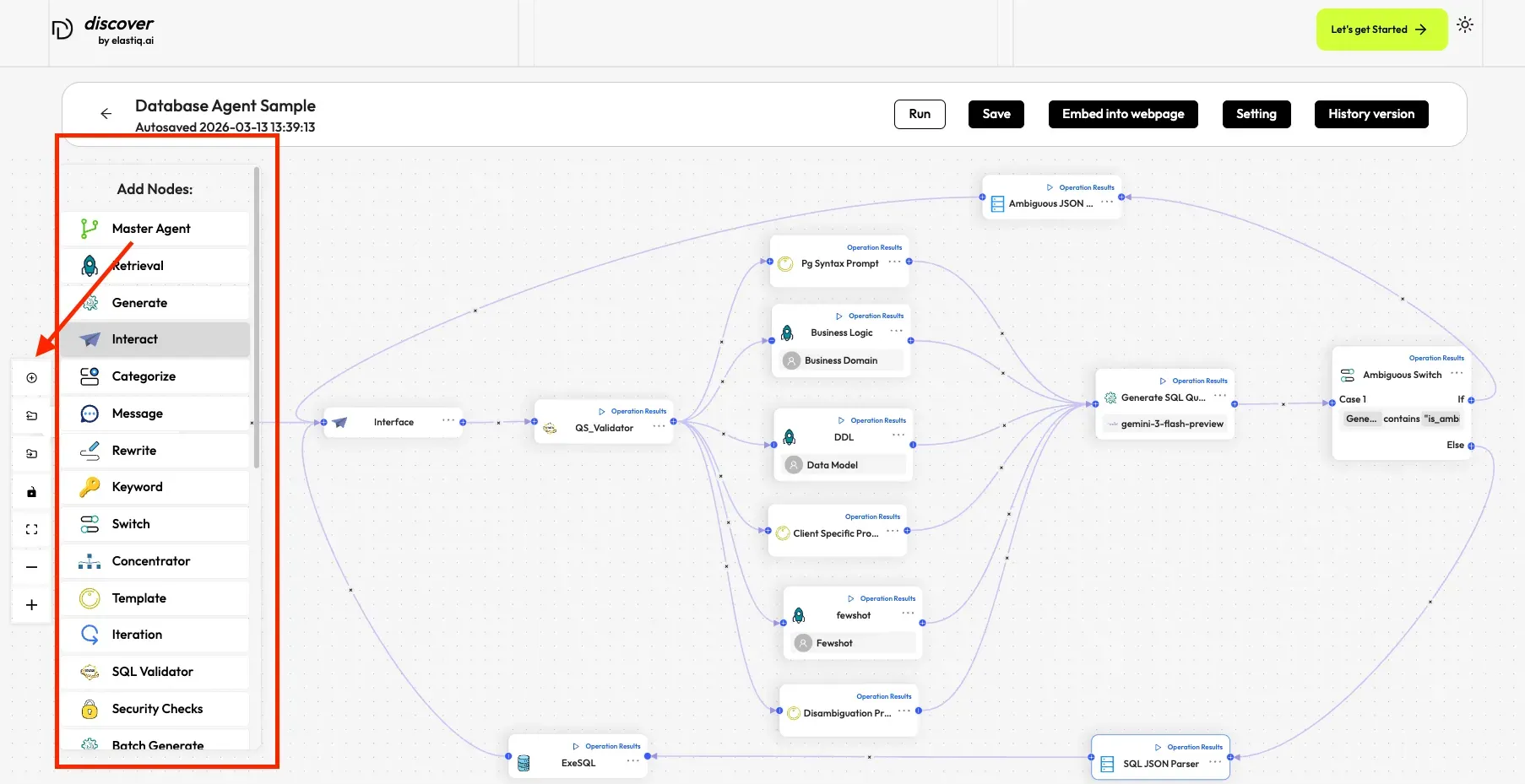
Section titled “Adding Components”Components (also called Nodes) are added from the component panel on the agent canvas:
-
Click the + icon on the agent canvas to open the component panel.
-
Find the component you want to add.
-
Drag and drop it onto the canvas.
Connecting Components
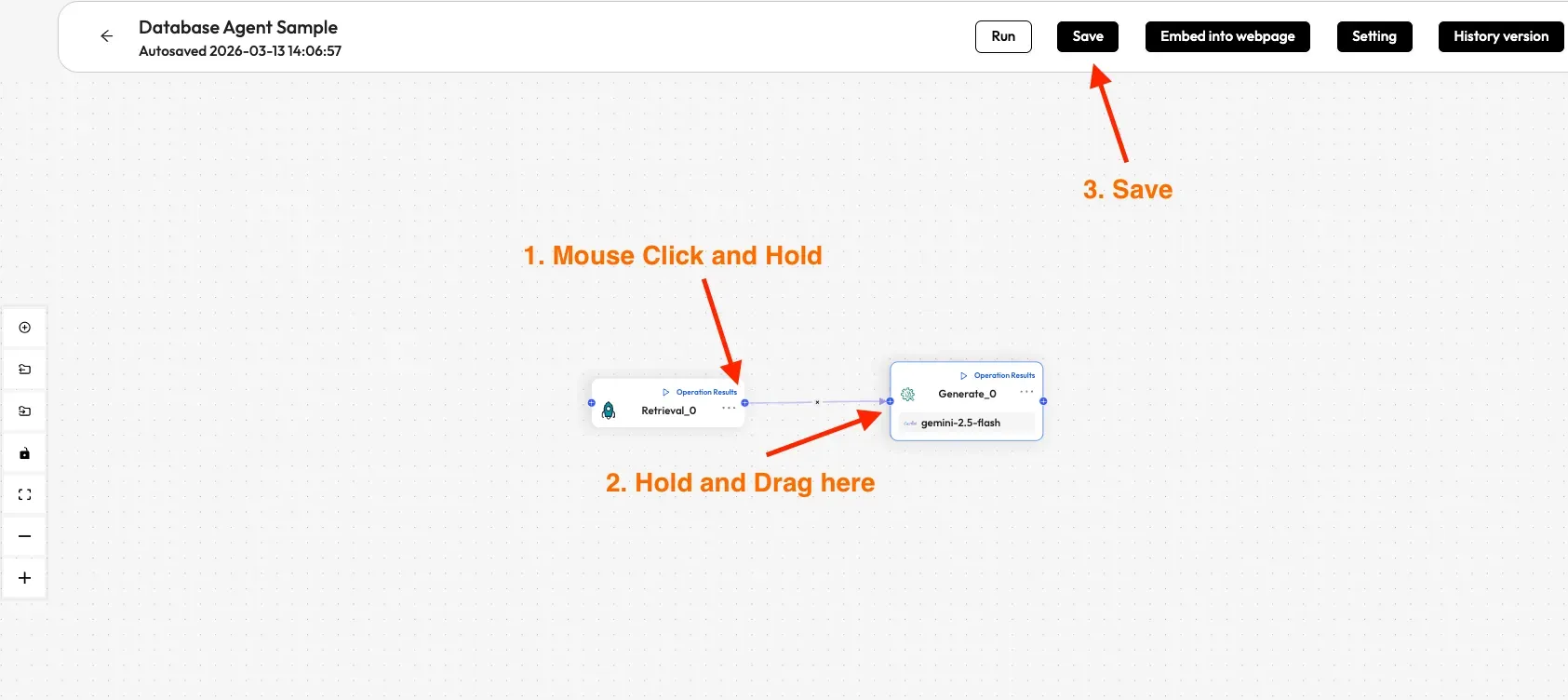
Section titled “Connecting Components”To define the flow between components, you connect them with edges:
-
Hover over the edge of a component until the connection handle appears.
-
Click and drag from that handle to the edge of the target component.
-
The direction of the drag determines the relationship — the component you drag from becomes the upstream node, and the component you drag to becomes the downstream node.
Types of Components
Section titled “Types of Components”Components are grouped into categories based on their role in the workflow:
| Category | What It Does |
|---|---|
| Input & Output | Define the start of the workflow and format final responses |
| LLM-Based | Use a language model to generate, classify, or rewrite content |
| Retrieval | Search knowledge bases for relevant context |
| Routing & Flow Control | Branch the workflow based on conditions |
| Orchestration | Coordinate multiple sub-agents for complex queries |
| Database & SQL | Connect to databases, generate, validate, and execute SQL |
| Integrations | Call external APIs or send emails |
| Utilities | Add canvas annotations for documentation |
Input & Output
Section titled “Input & Output”| Component | Description |
|---|---|
| Begin | The required starting node of every workflow. Sets the opening greeting and defines any global input variables the agent accepts. |
| Template | Formats data from multiple sources into a single output using {key} placeholders — useful for building structured responses or HTML output. |
LLM-Based Components
Section titled “LLM-Based Components”These components use a language model to process or generate content.
| Component | Description |
|---|---|
| Generate | Prompts an LLM to produce a response. Uses keys ({variables}) to inject context from upstream components into the system prompt. |
| Rewrite Question | Rewrites a user query based on prior conversation context, improving retrieval accuracy for follow-up questions. Usually placed upstream of Retrieval. |
| Categorize | Uses an LLM to classify user input into predefined categories, each routing to a different downstream path. |
Retrieval
Section titled “Retrieval”| Component | Description |
|---|---|
| Retrieval | Searches one or more knowledge bases and returns the top-N most relevant chunks. Supports vector similarity, keyword search, reranking, and knowledge graphs. |
Routing & Flow Control
Section titled “Routing & Flow Control”| Component | Description |
|---|---|
| Switch | Evaluates rule-based conditions (equals, contains, greater than, etc.) and routes execution to the first matching branch. No LLM involved. |
Orchestration
Section titled “Orchestration”| Component | Description |
|---|---|
| Coordinator | Coordinates multiple specialized sub-agents. Analyzes task complexity (LOW/MEDIUM/HIGH), routes to appropriate sub-agents, and synthesizes results into a unified response. |
Database & SQL
Section titled “Database & SQL”| Component | Description |
|---|---|
| ExeSQL | Connects to a MySQL, PostgreSQL, or MariaDB database and executes SQL queries. Includes auto-repair retry logic for failed queries. |
Integrations
Section titled “Integrations”| Component | Description |
|---|---|
| Invoke | Makes HTTP requests (GET, POST, PUT, etc.) to external REST APIs. Use it to fetch live data or trigger webhooks. |
Utilities
Section titled “Utilities”| Component | Description |
|---|---|
| Note | A non-functional annotation node. Adds comments or design notes directly on the canvas for documentation purposes. |